


If you like SODEW and want to see the service thrive, set up a monthly payment.
This article covers the following topics:
Pay What You Want
The recommended amount is at least 3 € (or equivalent in your currency, chosen in the next step) a month. This lets us keep the lights on, as well as maintain and develop the features you love!
- Log in to your website administration panel.
- In the left menu, select SODEW Pay.
- Select your Price on the scale.
- Click the Pay Now! button to confirm your price.
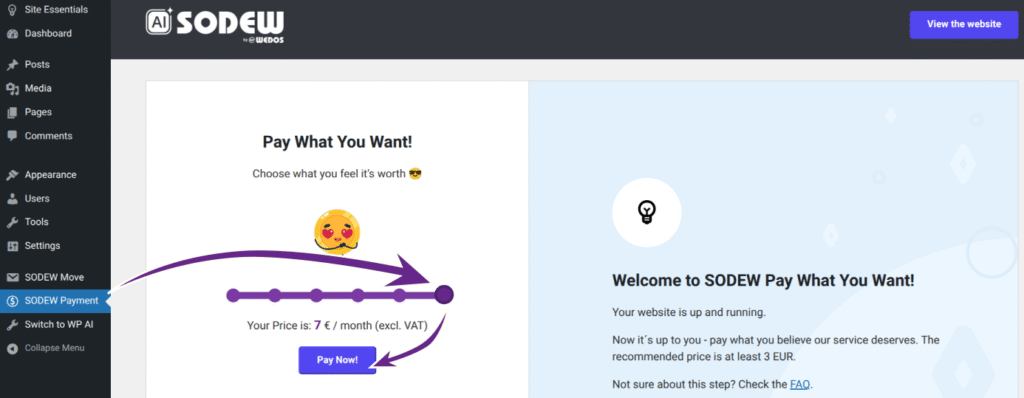
This will direct you to tha payment gateway, FastSpring checkout (sodew.onfastspring.com), which handles your order.
On the Checkout page, go over the:
- subscription dates and terms
- price (incl. VAT, varies by country)
- FastSpring terms of service and privacy policy.
Then choose your payment method – Card, PayPal, Apple Pay, Google Pay, or Wire Transfer (if supported).
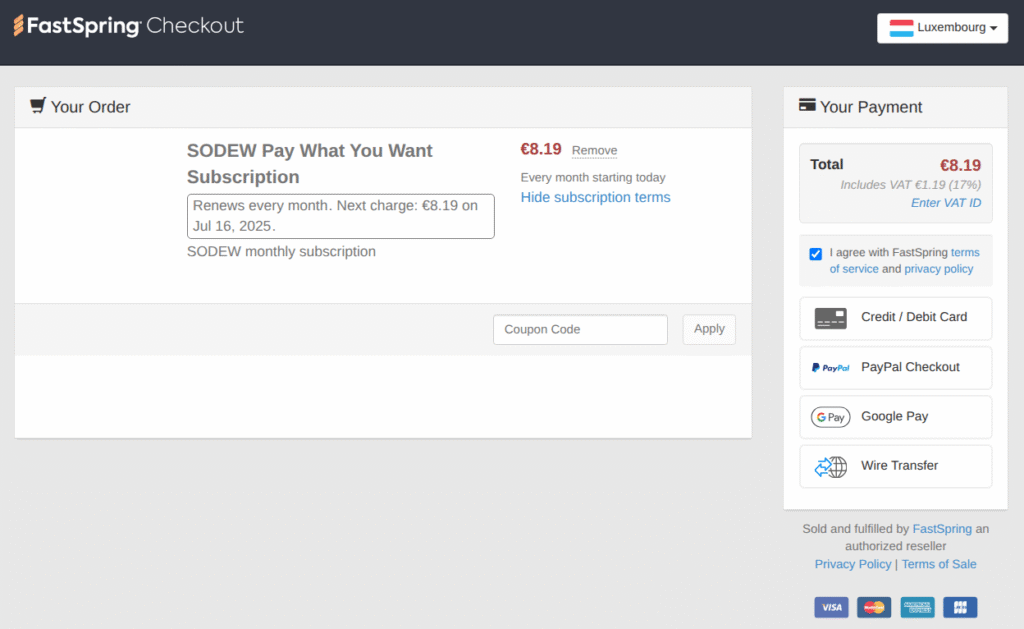
Perform the payment as instructed. When successful, the Fastspring platform will send you an email notification.
Subscription Management
To manage or cancel your subscription, go to the SODEW Pay interface as described earlier in this article.
- To change the amount you pay, select your price and click the Change Monthly Fee button.
- To cancel the subscription, click the link in the SODEW Pay hints section.